ChatGPT Prompts for Twitter Replies That Actually Sound Human (+ A Faster Alternative)
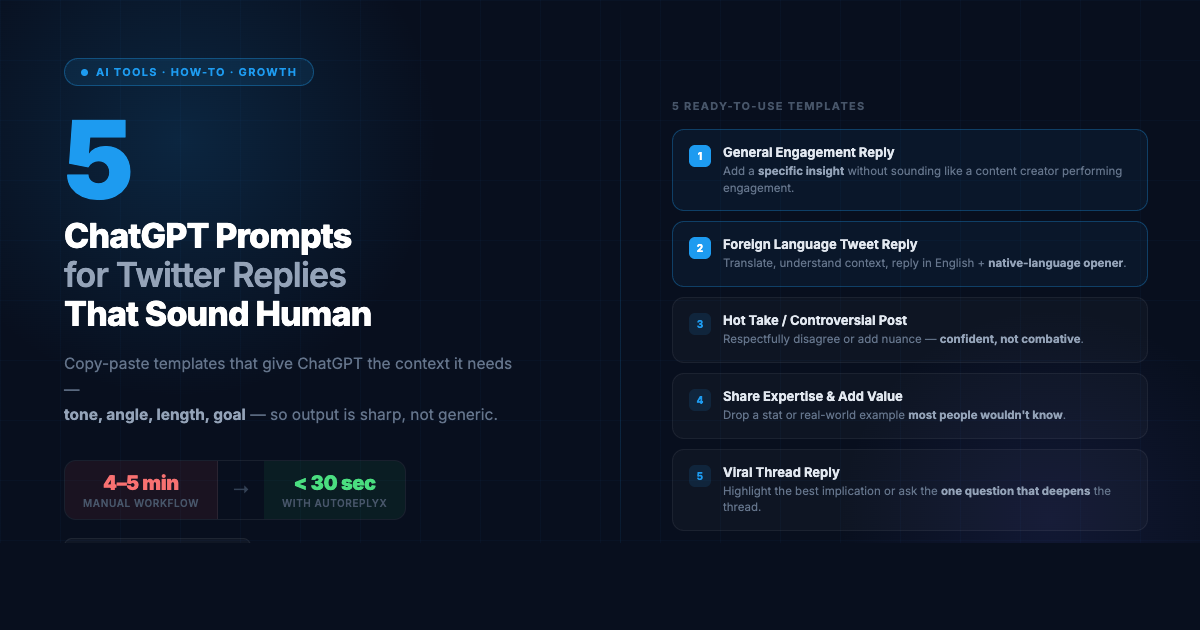
5 copy-paste ChatGPT prompt templates for writing Twitter replies — including how to handle foreign language tweets — plus what to do when the manual workflow gets too slow.
Most AI-generated Twitter replies have the same problem: they sound like they were written by someone who has read about Twitter but never actually used it.
Overly polished. Suspiciously agreeable. Structured like a LinkedIn post. Starting with “Great insight!” and ending with “What do you think?” — as if the template was never edited.
People scroll past these instantly.
The issue isn’t ChatGPT — it’s the prompt. Give it vague instructions and you get vague output. Give it the right context and constraints, and you get replies that are sharp, specific, and genuinely useful to the conversation.
Here’s how to write those prompts.
Why Most AI-Generated Twitter Replies Fall Flat
The default ChatGPT reply prompt looks something like this:
“Write a Twitter reply to this tweet: [paste tweet]”
ChatGPT has no idea:
- What tone you want
- What angle you’re taking
- How long it should be
- What your goal is (visibility, starting a conversation, establishing credibility)
- Whether you’re an expert in this topic or a curious outsider
Without that context, it fills in the blanks with safe, generic defaults. That’s why you get “Great point! I completely agree. This really resonates with me.”
A better prompt specifies all of that upfront.
The Anatomy of a Good Twitter Reply Prompt
Every effective ChatGPT prompt for Twitter replies should include these five elements:
- The original tweet — paste the full text (or URL if using a plugin)
- Brief context — what is this tweet actually about? What’s the implied subtext?
- Your angle — are you agreeing, disagreeing, adding nuance, sharing a related experience, asking a question?
- Tone — casual, technical, thoughtful, slightly contrarian, curious?
- Length constraint — “1–2 sentences” or “under 280 characters” forces concision and avoids bloated output
Add those five and your output quality jumps immediately.
5 Copy-Paste ChatGPT Prompt Templates for Twitter Replies
Template 1: General Engagement Reply
Use this when you want to add to a conversation without a strong take.
Tweet: [paste tweet]

Write a 1–2 sentence Twitter reply that adds a specific, relevant insight to this conversation. Sound like a knowledgeable person talking to a peer — not a content creator performing engagement. Don't start with "Great" or "Interesting." Don't end with a question unless it's genuinely interesting.
Template 2: Reply to a Foreign Language Tweet
Use this when you want to engage with a tweet in Japanese, Spanish, Korean, Portuguese, or another language.
Here is a tweet in [language]: [paste tweet]

First, translate it into English for me. Then, write a 1–2 sentence reply in English that responds directly to the content. The reply should sound natural and add something — a data point, a related observation, or a genuine question. Avoid generic phrases. Keep it under 200 characters if possible.

Also write an optional one-sentence opener in [language] that I can put before the English reply to acknowledge the community.
Template 3: Reply to a Hot Take or Controversial Post
Use this when a tweet is making a bold or divisive claim and you want to push back (or agree, with nuance).
Tweet: [paste tweet]

This is a hot take. Write a reply that respectfully disagrees (or adds nuance) in 1–2 sentences. Sound confident but not combative. Be specific — don't just say "it's more complicated than that." Give a concrete reason or counterexample. Don't hedge excessively.
Template 4: Reply to Share Expertise or Add Value
Use this when you have genuine knowledge on the topic and want to establish credibility.
Tweet: [paste tweet]

I work in [your field/niche]. Write a 2–3 sentence reply that adds expert context to this tweet. Include one specific detail, statistic, or real-world example that most people wouldn't know. Sound like a practitioner talking to another practitioner — not a consultant summarizing a whitepaper.
Template 5: Reply to a Viral Thread
Use this when replying to the opening tweet of a thread that’s gained a lot of traction.
This is the opening tweet of a viral thread: [paste tweet]

Write a 1–2 sentence reply that either (a) highlights the most interesting implication of what they're saying, or (b) asks the one follow-up question that would genuinely deepen the conversation. Sound like someone who read the full thread carefully, not someone reacting to just the headline.
How to Use These Prompts for Foreign Language Tweets
Template 2 handles the basics, but foreign language replies have some extra layers worth knowing.
Translation first, always. Before writing any reply, make sure you understand what the tweet is actually saying — not just the literal words, but the subtext. Ask ChatGPT to explain the cultural context if the tweet references something specific to that market.
Check your cultural tone. A reply that works well in an American tech thread might land awkwardly in a Japanese tech thread. Japanese Twitter communities tend to value precision and humility. Latin American communities often reward warmth and directness. Ask ChatGPT: “Is this reply appropriate for [culture]? Would anything come across as rude or off-tone?”
The native-language opener is optional but powerful. A single accurate sentence in Japanese or Spanish before your English reply signals that you’re engaging respectfully, not just pasting machine translation. It gets noticed. Use Template 2’s optional opener for this.
Always verify what you’re posting. If you write any part of the reply in the original language, have ChatGPT translate it back into English to confirm the meaning is what you intended. Don’t post something in Japanese without knowing exactly what it says.
The Limitation: This Still Takes 4–5 Minutes Per Reply
Even with these templates, the manual workflow has a ceiling.
You find the tweet. You copy the text. You open ChatGPT. You build the prompt. You iterate once or twice. You copy the output. You switch back to Twitter. You paste, re-read, edit, post.
That’s 4–5 minutes per reply at best.
If you’re doing 5 replies a day, that’s 20–25 minutes of overhead before writing a single original post. At 10 replies, you’re close to an hour — just in context-switching.
The templates make each iteration better. They don’t make the workflow faster.
How AutoReplyX Automates the Entire Loop
AutoReplyX was built specifically to collapse this workflow.
Instead of copy-paste-prompt-paste, you do one thing: paste the tweet URL.
AutoReplyX fetches the tweet, detects the language, understands the context, applies the appropriate tone, and generates a native-quality reply — all automatically. Every reply comes with a translation preview so you always know what you’re posting.
The output is equivalent to running Template 2 with all five elements filled in correctly — but it takes under 30 seconds instead of 4–5 minutes.
For one-off replies, the manual prompts work fine. For anyone building cross-language engagement into a daily habit, the manual workflow won’t scale. AutoReplyX is the upgrade.
Try It Free
AutoReplyX gives you 10,000 free credits on signup. That’s 100 replies, no credit card required.
Skip the prompting. Get the reply in seconds at app.autoreplytool.com →
Keep the prompts for when you want to craft something manually. Use AutoReplyX when you want to move fast.
Ready to try it yourself?
Start with 10,000 free credits — no credit card required.
Get 10,000 Free Credits →