How to Reply to Foreign Language Tweets Without Speaking the Language
You don't need to be fluent in Japanese or Spanish to engage with foreign language tweets. Here's the step-by-step — manual method and the faster alternative.
Someone searching for “how to reply to foreign language tweets” already knows the strategy works. They’ve seen the data, read a thread, or watched their impressions stall — and they’ve decided cross-language engagement is worth trying.
This post is just the method.
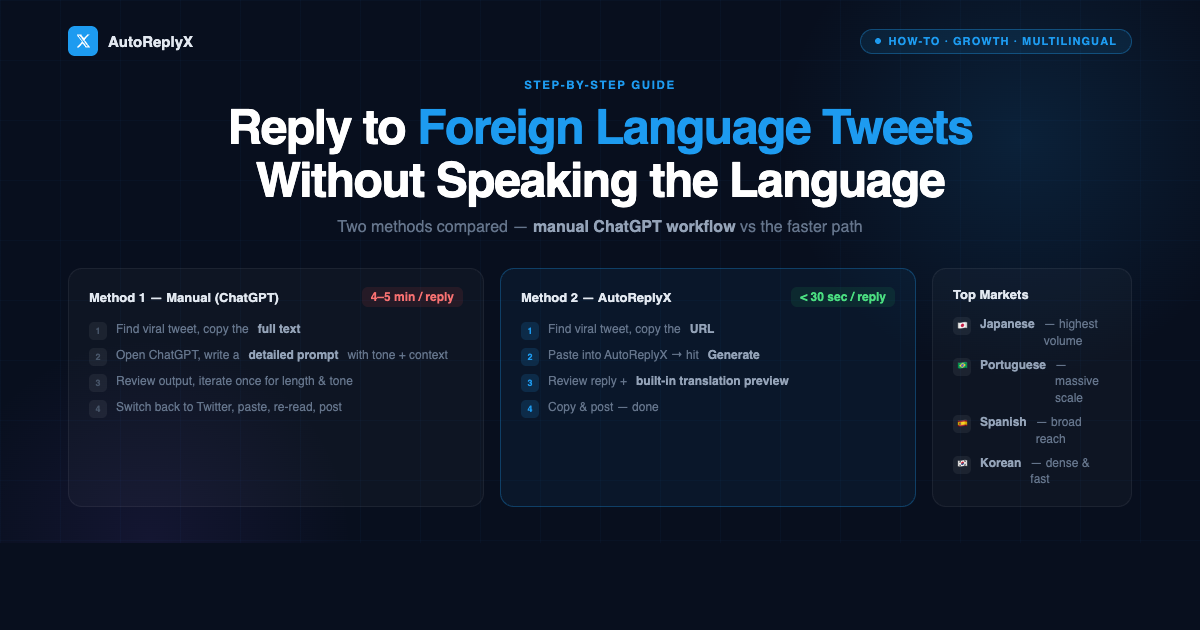
We’ll walk through two approaches: the manual ChatGPT workflow that anyone can start today, and the faster path if you plan to do this at any kind of volume.
Why Replying to Foreign Tweets Is Worth Your Time
Quick context if you need it: over 60% of Twitter’s daily activity happens in languages other than English. Japanese, Spanish, Korean, Portuguese — these are massive, active markets where viral tweets pull millions of impressions daily.
The kicker: almost no English-speaking creators show up in those threads.
That means low reply competition, high novelty, and real visibility spikes for creators willing to engage there. We covered the full strategy in depth here — this post focuses purely on execution.
Method 1: The Manual ChatGPT Workflow
This works. It’s slow, but it works — and it’s free. Here’s the step-by-step.
Step 1: Find the tweet
Use Twitter’s search with a language filter. Add lang:ja (Japanese), lang:es (Spanish), lang:ko (Korean), or lang:pt (Portuguese) to any search query to surface tweets in that language.
Look for tweets with high like counts and active replies — those are still gaining momentum and worth engaging with.
Step 2: Copy the tweet text
Select the full tweet text and copy it. If the tweet has context from a thread, grab a few tweets above it too — context helps ChatGPT write a more relevant reply.
Step 3: Write your ChatGPT prompt
This is where most people go wrong. A generic prompt produces a generic reply. A good prompt includes:
- The original tweet text (in its original language)
- What the tweet is about, briefly
- The tone you want (thoughtful, curious, agreeable, contrarian)
- The language to reply in (usually English, sometimes the original language)
- A length constraint (1–3 sentences works best for replies)
Example prompt:
“Here’s a Japanese tweet: [paste tweet]. It’s about [brief topic]. Write a 2-sentence reply in English that adds a genuine insight and sounds natural — not corporate or generic. Avoid filler phrases like ‘great point.’”
Step 4: Review and refine
ChatGPT’s first output is often too long, too formal, or slightly off-topic. Plan to iterate once. Ask it to shorten, adjust tone, or be more specific.
Step 5: Paste and post
Switch back to Twitter. Paste the reply. Read it once more. Post.
Total time per reply: 4–5 minutes.
Common mistakes with the manual method
- Too generic. A reply that could apply to any tweet gets ignored. Force specificity in your prompt.
- Wrong tone. Tech communities in Japan respond differently than business communities in Brazil. Read a few other replies in the thread to get a feel for the tone before writing your prompt.
- Losing context. If you only paste one tweet without thread context, the reply can miss the point entirely. Grab 2–3 tweets from the thread if it’s part of a longer conversation.
Method 2: AutoReplyX
AutoReplyX does everything in Method 1 — translation, context understanding, tone-matching, generation — in a single step from the tweet URL.
Step 1: Find the tweet
Same as above. Find a viral tweet in your target language with strong engagement.
Step 2: Copy the tweet URL
Not the text — just the URL from your browser bar or the share menu.
Step 3: Paste into AutoReplyX and generate
Paste the URL at app.autoreplytool.com. Hit Generate.
AutoReplyX fetches the tweet, detects the language, reads the context, and writes a reply.
Step 4: Review the reply and translation
Every generated reply comes with a translation into your language. You always know exactly what you’re posting before you post it.
Step 5: Post
Copy the reply. Post it on Twitter.
Total time per reply: under 30 seconds.
Side-by-Side Comparison
| Manual (ChatGPT) | AutoReplyX | |
|---|---|---|
| Time per reply | 4–5 minutes | Under 30 seconds |
| Steps | 5 (copy text → write prompt → iterate → paste → post) | 2 (paste URL → post) |
| Translation preview | Manual — you have to ask for it separately | Built-in with every reply |
| Context understanding | Depends on your prompt quality | Automatic |
| Mobile-friendly | No — context-switching is painful on mobile | Yes — works entirely in the browser |
| Cost | Free (ChatGPT free tier) | 10,000 credits free on signup |
| Best for | Occasional one-off replies | Daily engagement at scale |
The manual method works if you’re doing 1–2 replies a day and have time to craft each one carefully. AutoReplyX is the better choice if you want to build cross-language engagement into a consistent daily habit.
Tips for Writing Replies That Actually Get Engagement
Whether you use the manual method or AutoReplyX, the reply still needs to be worth reading. Here’s what separates replies that get engagement from replies that disappear:
Add something specific. “Interesting perspective” contributes nothing. A data point, a counterexample, a related observation — these invite a response.
Ask a genuine question. Questions get replies. Replies boost your visibility in the thread. “What’s driving this trend in Japan specifically?” is better than making a statement and going silent.
Match the energy of the thread. If the thread is technical and dense, don’t post something breezy. If the thread is casual, don’t write a wall of text.
Keep it short. 1–3 sentences is the sweet spot. Long replies in someone else’s thread look like hijacking.
Don’t start with “Great post!” It signals you didn’t really engage with the content. Start with your actual thought.
Languages with the Most Opportunity for English Creators
Not all markets are equal for cross-language engagement. Here’s where the effort-to-return ratio is best:
Japanese 🇯🇵 — Highest volume and engagement density. Tech, gaming, and business communities are especially active. English is understood but rarely appears in threads, so novelty is high.
Spanish 🇪🇸🇲🇽🇦🇷 — Enormous combined market across Spain and Latin America. Entrepreneurship, crypto, and lifestyle content perform well. Many Spanish speakers also read English, which increases your reply’s reach beyond just your followers.
Korean 🇰🇷 — Dense, fast-moving communities. Tech and creator content travel well here. Replies need to be on-point — Korean Twitter communities are discerning.
Portuguese / Brazilian 🇧🇷 — One of Twitter’s most active markets by volume. Business, finance, and personal development content resonates. Brazil alone has tens of millions of active Twitter users.
Start with one language — ideally the one that maps most directly to your niche — and build the habit before expanding.
Try It Free
AutoReplyX gives you 10,000 free credits on signup — that’s 100 replies with no credit card required.
Start for free at app.autoreplytool.com →
Pick a language. Find one viral tweet. Reply before the moment passes.
Ready to try it yourself?
Start with 10,000 free credits — no credit card required.
Get 10,000 Free Credits →